Process · AI-Native Workflow
An AI-Native Product Design and PM Workflow — from first stakeholder conversation through post-launch iteration.
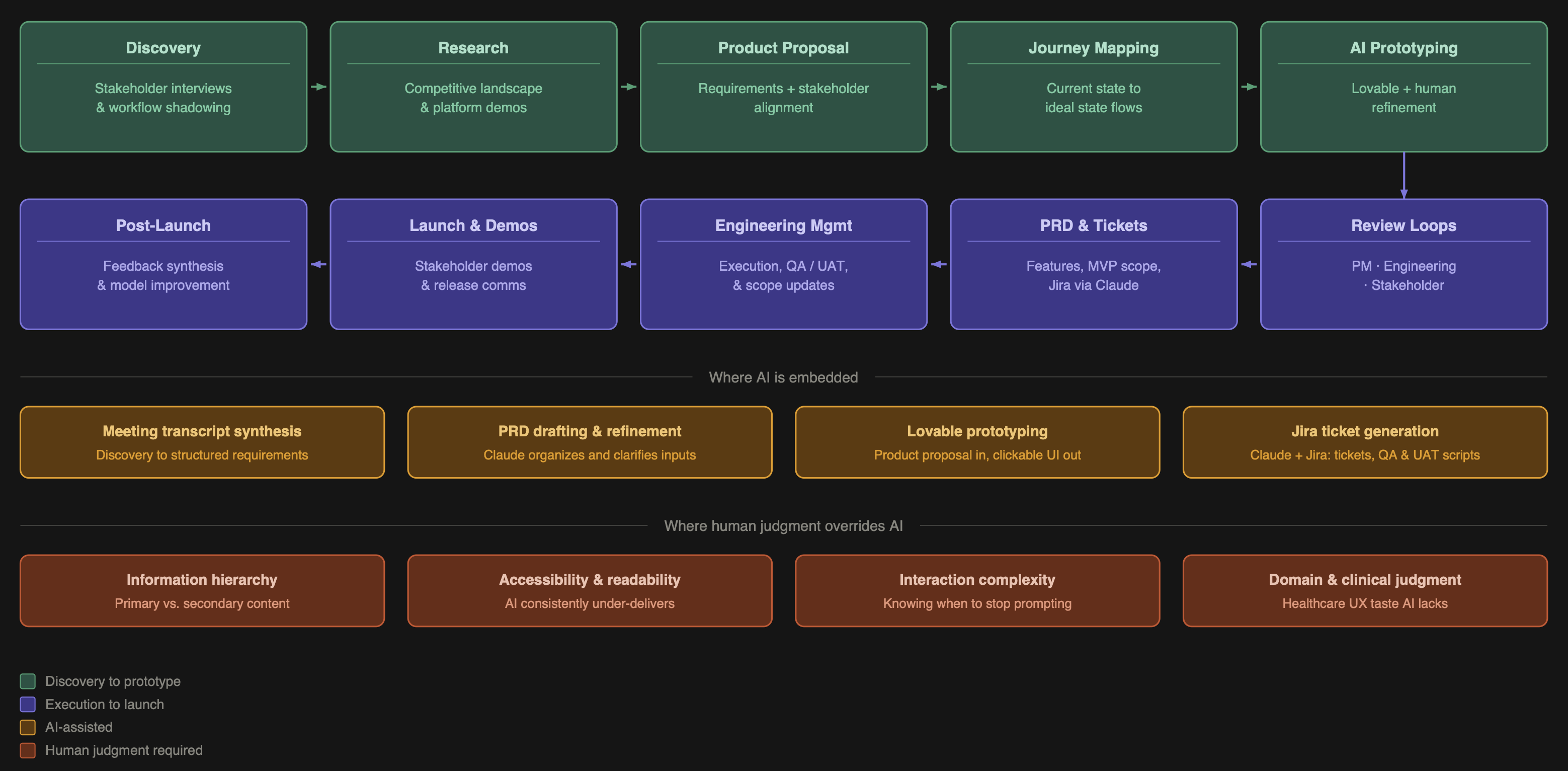
I've spent years at the intersection of healthcare UX and product management, designing tools used by clinicians, care coordinators, researchers, and data teams. The work is complex, the stakes are high, and the timelines are never long enough. AI changed that equation for me. Not by replacing my judgment, but by compressing the distance between an idea and a working prototype.
I now spend roughly 20% of the time I used to on design execution, and I redirect the rest into product strategy, cross-functional alignment, and deeper stakeholder work. This is my end-to-end process — the same approach I bring to every product I build.
Design execution time saved
~80%
Time redirected to
Strategy
Figma weeks →
Hours
Phase 1
Discovery
Every project starts the same way: I get as close to the real work as possible. I sit with stakeholders, shadow their workflows, and ask questions until I understand not just what they do but why they do it that way and where it breaks down. I'm looking for where people lose time, miss context, or make decisions with incomplete information.
Phase 2
Research
I survey the competitive landscape to understand what tools exist, how they approach the problem, what they get right, and where they fall short. AI accelerates the initial scan, but I go hands-on for anything that matters — requesting demos, reading research documentation, and talking to people who use competing products. When AI is embedded in the product itself, this step also means understanding how other teams have approached trust, explainability, and error handling.
Phase 3
Product Proposal
I consolidate everything — stakeholder needs, research findings, and my own synthesis — into a product proposal document. This is a detailed requirements artifact covering what the product does, who it's for, what problems it solves, and what it explicitly does not do.
I share this with stakeholders for alignment before writing a single line of interaction design. Sign-off here prevents expensive rework later.
Phase 4
Journey Mapping
I map the user journey through the proposed product, covering both current state and ideal state, to pressure-test the requirements against real workflow logic. This stays human-led. Workflow logic is too domain-specific and context-dependent for AI to navigate reliably.
Phase 5
AI Prototyping
This is where the workflow becomes genuinely different from traditional design practice. I feed the product proposal document into an AI prototyping tool and generate a clickable, visually structured prototype. What would have taken two to three weeks in Figma takes hours. But the output isn't done.
This is where my background as a trained designer and healthcare domain specialist becomes the product:
Information hierarchy — AI doesn't know what a user considers primary versus supporting detail. I restructure visual weight and progressive disclosure based on how the actual user thinks about their work — what needs to catch the eye immediately versus what lives in a secondary panel.
Accessibility — AI-generated UIs consistently underperform here. Color contrast, type sizing, and information density all require active correction. The right defaults depend on the context of use — device type, lighting conditions, user stress levels — not on what an AI produces by default.
Complex interactions — Some interactions require disproportionate prompting effort. Knowing when to stop prompting and instead document the interaction spec for engineering is itself a skill.
Phase 6
Review Loops
I run two distinct review cycles with different goals and different versions of the prototype.
Engineering review — Focused on feasibility, edge cases, and handoff clarity. I adjust scope here if I get pushback on complexity.
Stakeholder review — Focused on whether the product solves the right problem and whether the workflow feels right. I show enough to communicate primary user actions clearly.
Phase 7
PRD, Tickets & Execution
From aligned prototype to engineering handoff, I produce the full PRD, break requirements into features, prioritize MVP versus future versions, and generate Jira tickets via a Claude integration. I manage engineers through execution, updating prototypes when scope changes and maintaining a living product roadmap.
Phase 8
Post-Launch
After launch I run a structured audit covering what shipped, what worked, what didn't, and where the AI model can be improved based on human override patterns. Override rate is one of my most important signals — it tells you where the AI is miscalibrated and what training data you need.
The value of this workflow isn't that AI does the work. It's that AI compresses the parts of the work that don't require my expertise, freeing me to apply judgment where it actually matters.
Information hierarchy — AI generates interfaces where everything looks equally important. In high-stakes tools, that's not a design problem — it's a product failure.
Accessibility — Color contrast ratios, type sizing, and interactive element sizing for the actual context of use — variable lighting, tablet vs. desktop, high-pressure environments — are not AI defaults. They are mine.
Interaction depth — Knowing when the prototype is good enough to communicate the concept and when to stop and write the spec instead is judgment, not prompting.
Scope creep from AI output — AI prototyping tools frequently generate features I didn't ask for. Evaluating those against MVP constraints in real time is a product management decision.
AI prototyping tools reduced my design execution time by approximately 80%. That's not a claim about AI being better at design. It's a claim about where my time is most valuable. The time I recovered goes into product strategy, cross-functional alignment, earlier discovery, and more rigorous stakeholder work. The product is better because I'm spending more time thinking and less time pushing pixels.
I'm actively operating as a fully AI-native PM, with generative AI embedded across the entire product lifecycle from the first stakeholder conversation through to post-launch iteration. This case study is a snapshot of how I work — March 2026.